One export, a whole year
What your Timeline turns into
Google already recorded every drive. Time-mile reads that record and gives you back what a tax return or an expense claim asks for.
A deduction, not just a distance
The official rate of 15 countries is built in, and each trip is valued at the rate in force on its own date. When the IRS raised its rate on July 1, 2026, the log applied both.
How the deduction works →Drives, not train rides
Trips by train, bus, bike or on foot are flagged in the total, and the report offers to leave them out. Say which places are home, work and clients, and your commutes drop out of the deduction on their own.
From Timeline to log →The file your phone gives you
A Timeline.json from Android or iPhone, whatever your language names it, or an old Takeout ZIP. Drop several and they merge into one log, each trip counted once.
Get your export →Every format you need
CSV for Excel or Sheets, a PDF to keep with your return, JSON, KML and GPX for Google My Maps, and an import file for Everlance.
Export to Excel →Days in each country
The same file counts the days you spent in each country per year, with every stay abroad, for a citizenship form or a 183-day count. Days without data say so.
Your travel history →Your year on a map
Every trip of a paid year on one map, coloured by purpose. Download it as an image or a printable A4 page.
See the map →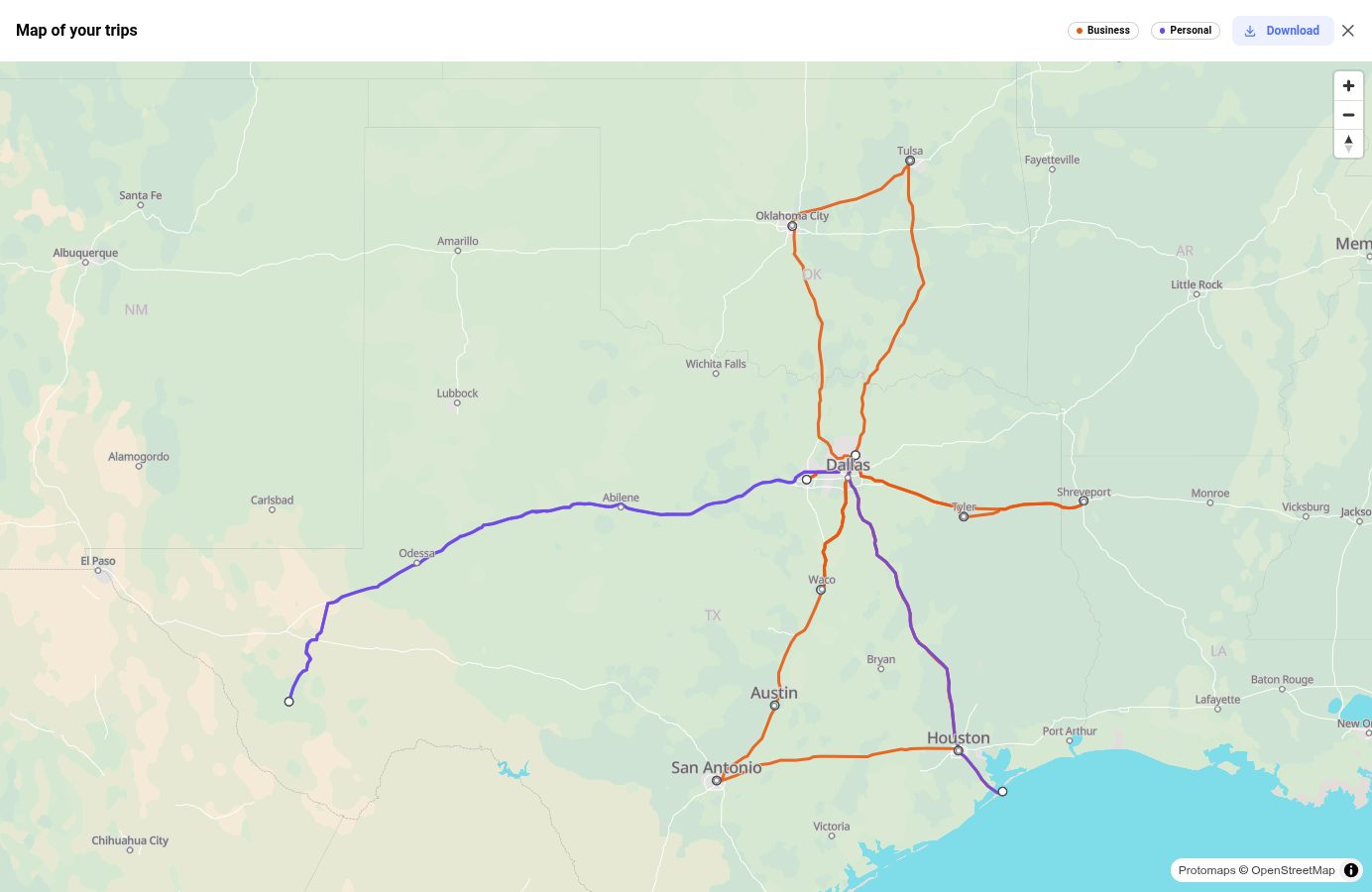
A year of client visits, on one map
Business in one colour, personal in another, drives only by default. Click a line to see the trip behind it, then download the map for your records or for the wall.
Open your Timeline →Changelog
What's new
What changed in the app lately, newest first.
-
See the map →
Your trips on a map
Every trip of a paid year on one map, coloured by purpose, with a single trip shown on a click. Downloads as PNG or as an A4 PDF.
-
Read the guide →
Days per country
The days you spent in each country, year by year, with the list of stays abroad. Worked out on your computer, like everything else.
-
How to use it →
KML and GPX export
Open your trips in Google My Maps, Google Earth or any GPS tool.
-
Fill missed drives →
An import file for Everlance
Fill the months a tracker missed with Everlance's Import History, straight from your Timeline.
-
The ATO logbook →
A weekly logbook, for subscribers
For Australia, New Zealand, Canada and the US: the logbook builds as the year runs, with a weekly reminder and the new trips flagged for review.
FAQ
Frequently asked questions
The export, the rates and what happens to your data.
I forgot to keep a mileage log. Can I rebuild a past year?
Yes, if Google Maps Timeline was on that year. Export it from your phone and open it here: every drive comes back with its date, where it started and ended, its distance, and the deduction at the official rate in force on that day. You mark which places are business, your home or your workplace, name the ones that matter, such as a client or a site, and write the business purpose of each once: every trip there carries it. For a US return, the report also gives the miles for Schedule C lines 44a to 44c and the amount for line 9. Reading the whole year and seeing an estimate of the deduction is free; exporting a closed year costs $39 once, or $89 for every past year.
Read the full guide →How do I export Google Maps Timeline to Excel?
Time-mile opens your JSON export from Google Maps in your browser and converts it into a clean CSV that opens in Excel. Takeout offers the archive as a ZIP or a TGZ and both are read here, as is a Timeline.json straight off an Android or iPhone. Drop several exports at once (an old Takeout archive plus a recent phone export) and they merge into a single log covering every year, with trips present in both counted once.
Read the full guide →Can I use this for tax mileage deductions?
Yes. The PDF and CSV reports list every trip with its date, where it started and ended, its distance and the amount at your country's official rate, and the CSV says whether it was business, home-to-work or personal: the records a mileage deduction or a reimbursement claim is built on.
Read the full guide →How do I convert my Timeline into a mileage log?
Import your Timeline.json or Takeout ZIP, filter to your driving trips, and export a CSV, JSON, or PDF mileage log ready to keep with your records: all in your browser, nothing uploaded.
What is the IRS mileage rate for 2026?
72.5 cents per mile through June 30, then 76 cents from July 1, an unusual mid-year increase that makes a dated mileage log essential. Our guide covers the full rate table.
Read the full guide →What if my Timeline was migrated to my phone?
Google has recently moved Timeline data to on-device storage. Time-mile fully supports the new "Direct Export" method from Android and iOS devices, which is now the only way to get recent history.
Read the full guide →Can it count the days I spent in each country?
Yes. Days per country reads the same file and counts, for each calendar year, the days you spent in each country, with the list of stays abroad: the dates a citizenship application, Form N-400 or a 183-day count asks for. Days without data are marked unknown, never guessed.
Read the full guide →Can I see my trips on a map?
Yes, with a paid plan for that year. Every trip of the year is drawn on one map, coloured by purpose, and a single trip can be shown on its own. The map downloads as an image or a printable A4 page, for a road trip on the wall, and the trips also export as KML or GPX for Google My Maps.
Read the full guide →Is my location data shared with anyone?
Your Timeline file is processed in your browser's memory and never uploaded to a server. One option sends data out: Find addresses, a Premium feature, sends the rounded position of each stop (about 11 m) to Google's geocoding service to get its street address.
Official 2026 rates, built in
Time-mile works anywhere in the world, and computes the deduction for 15 countries, each with its own guide:
- 🇺🇸 IRS: 67¢ → 76¢/mile
- 🇬🇧 HMRC: 55p/mile
- 🇨🇦 CRA: 73¢/km
- 🇦🇺 ATO: 91c/km
- 🇫🇷 Barème kilométrique
- 🇩🇪 Kilometerpauschale
- 🇪🇸 Kilometraje: 0.26 €/km
- 🇵🇹 Quilómetros: 0.40 €/km
- 🇳🇿 IRD kilometre rates
- 🇮🇹 Rimborso chilometrico
- 🇮🇪 Civil Service rates
- 🇨🇭 Swiss rate: CHF 0.75/km
- 🇦🇹 Kilometergeld: €0.50/km
- 🇧🇪 Indemnité: €0.4761/km
- 🇳🇱 Kilometervergoeding: €0.25/km
Pricing
Pay for the year you file
Read your whole timeline for free, with an estimate of your deduction. You only pay for the year you export.
Free
See everything before you pay
- Read in your browser, nothing uploaded
- Every trip and an estimated deduction
- Filter by date and activity
- Preview export: the first 10 rows, marked as a preview
- Unlimited exports
One tax year
A closed year, unlocked for good
- Unlimited export of that year
- Per-trip deduction amounts in every export
- Street addresses on every trip *
- The year's trips on a map
- Yours for good, no subscription
All past years
Every closed year at once
- Everything in One tax year
- Every past year, not just one
- Best when several years are late
- Yours for good, no subscription
The year in progress
The running year is still growing, so it is rented rather than sold
- Everything in One tax year
- The current year, kept up to date all year long
- Weekly logbook in AU, NZ, CA and the US
- Any year you are subscribed for four months or more stays yours
* Address lookup is still in development: it runs against a daily limit, so a very large timeline may need more than one session.
Billed in your local currency where available.